Thursday, 2 August 2012

Nano Hair

I have a great new for a bald man... their hair can grow up in a minutes!!!... not so sure where i can explain this, but hey, its a biotechnology none ever created before..

please watch this video:


the girls will flock all over you again mr. bald-no-more..

Tuesday, 31 July 2012

Trash Can Invention : JAPAN

world of technologies bring us further a head with machine where the machine can understand human language. But how we design in to be in simplest daily task like Trash Can? How can you toss it like a boss and that trash can moving on its own? here is the video on how they do it. Japan, you have my respect on environmental upgrading..


 i think i wanna do some too. master my engineering course. hehehe

DIY : CCTV For Home (Part ONE)

Getting The Items Ready


Many people thinks that buying CCTV system is expensive and waste for only home environment. it is not true. from what i was thinking is, CCTV system is a must to prevent any crime on your property whether property theft, accident, and etc.

Today, i gonna tell you that under 200 bucks can get u CCTV system to your house. The item that we need is will be put in below list:

1. ANY IP camera. Come in 2 choices whether to used Wifi or Cable.
2. A SERVER. Can used old pc. the one which collecting dust around the corner. Must Have OS at least XP
3. ANY Router. the connection between server and IP camera. need to port forwarding the CCTV port.
4. ANY RJ45 Cable. Connection between Router to SERVER.
5. An Internet Connection. This one is OPTIONAL.

Overview

Camera

For this experiment, i choose Dlink DCS-920 IP Camera for home surveillance system. This camera come in 2 option whether to use Wifi or cable in a box. so its handy when to configure to Server or Router. This camera also have motion detection region or this system called Smart Recording. Smart Recording reduce your hard disk consumption because it only record when there are movements detect on the camera including shadows. To configure this thing is not very hard. Just it need to be configure using Cable first before you can use the Wifi. The pixel of this camera is up to 640 X 480 HQVGA which means the pixel are crystal clear in range 10m ~ 30m.

Router 

Probably you should buy router that come with Wifi Antenna. I said so because we need to design SmartHome Surveillance system. So less cable means more secure. Thief doesn't know where you put your server is, what cable should they cut. The hardest part for none-IT people in this is every router comes with different menu when come to port forwarding. for example, for Dlink DIR-600, the port forwarding fall under Advanced Menu. I personally don't know what other Router port forwarding categories is.

Server

Many people think if wanna server, u need to buy it. Why not you build one? Okay, take old pc that you don't use anymore. Clean it up. After cleaning it, please install at least Windows XP. Then, if you used Dlink IP Camera, they should provide you with CD Installation. Install the CD content and don't forget to configure IP for the camera and server at this server! many people done mistake that he/she thinks the CD is for camera's driver but it is not. The CD is Installation Program For The Server. After installing and configuring it, it become a server. This part is done.

Cable RJ45

Why we used cable? because the connection from pc to router need to be establish using LAN Cable or we called it RJ45. You also can convert the cable by installing the USB Wifi Dongle at server. its the same thing.
Just remember. Only Camera is using Wifi. because we need it to be secure.

Internet Connection

This is an optional where you can view your CCTV Live Streaming from internet to your house. If you want to do it, first you need to sign up at dyndns.com and register your server public IP. Then from there, you will need to setup your server to be able to play live streaming. I will explain in part 2 later.


So guys, are you with me? if you not understand any part of this section, please kindly inform me by leaving your comment or email me..

Part 2 in near future...

Monday, 30 July 2012

No Sql Approach

No SQL, exactly as its name. its the database that dont use the SQL syntax. the method apply when the database need to retrieve huge data in one single output.

the specification to use no sql is, there are not booking system, they are real time system that based on notification... when talked about notification. in your mind is Facebook. thats correct!!

Facebook used NoSQL database to retrieve huge comment, picture, sound, music and file system for the user. notification are included.

so what exactly NoSQL? the database that dont depend on relational object of one system.

  1. its a database that dont run sql
  2. its a coding that request huge amount of data from server
  3. its a server that put all the data together thus eliminated the traditional database

Who used it this days? 

  1. facebook
  2. twitter
  3. google
  4. yahoo
  5. amazon 
It is many NoSQL database out there? the answer is YES. not single NoSQL can done so many things at once. here is the list

  • Column Families
  • Document Store
  • Turple Store / Key-Value Store
  • Graph
  • Multimodel Database
  • Object Database
  • Grid and Cloud Database Solution
  • XML Database
  • MultiDimensional Database
  • MultiValue Database

so u need to know how to retrieve this database value based on what attributed you need to called. for myself, i need to learn more on how to cross platform the xml to the api NoSQL server..

see ya soon


Tuesday, 24 July 2012

Build our own Data Center


Every technician dream that our home filled with bunch of techies stuff and that carry incredible, out of mind blowing task to entire home. such as Home PBX, Wireless bridge, or Broadcasting Movies from your home. but today, i will guide you to what is SAN and what relation between SAN and Data Center...

Data Center is a center that govern all telecommunication, network, security and even data storage in one single center. The meaning of center here is it can be clusters, merging together, stacking each other, multiple network monitoring.

NAS is Network Attached Storage. Its a independence device that have built in network card to be plugin directly to the router or switch at our home. it have webserver built in to manage its own IP address. so user can upload store the file remotely. difference between SAN and NAS is, in NAS, U NEED TO KNOW THE IP ADRESS OF THE DEVICE. Meanwhile, SAN, U NEED TO INSTALL INITIATOR IN ORDER TO MAKE IT NATIVE LOCAL HARD DRIVE IN YOUR COMPUTER.

SAN is Storage Attached Network that provide you storage for iSCSI (Internet Small Computer System Interface) in LAN (Local Area Network) environment networking. typically mean that others computer storage/hard disk/partition can be like native local storage inside your computer if its in the same network as yours computer even the partition/hard disk are at another server..

illustration are best way to describe this..

This is the physical topology how SAN being put in a network.
This is Logical Topology how SAN share its storage..


How to build your own SAN? let me teach you how....

SAN requirement is :

1) SAN server can used old computer. depend on the requirement of the system.
2) FreeNAS software <---- this is a good linux software for setup SAN.
3) Router that support GigaByte LAN
4) RJ 45 depending on how long/many connection in your house..
5) Internet Connectivity to youtube how to setup FreeNAS 8.

That's all..... easy installation....


we will discuss about this when i have demand to build a SAN...

references :
Data Center
SAN (Storage Area Network)


Monday, 23 July 2012

The Introduction Of telephony System

in my childhood, i always wondering what telephone is made of. Why i can talk as if the person is in front of me despite their house are 2 miles from mine. then time move on..

today, i stumble across unified communication, using telephony system(PBX), look alike telephony system(VoIP - IP PBX), and some other unified communication(collaboration between existed system.).

lets we dive into the telephone system. in this title, station are referring to telephone. 


PBX
stands for private branch exchange where its a device that routing your phone from single line into multiple line inside you office. but nowadays the use of PBX are obsolete  because emerging new system.

IP PBX
this PBX using intranet / ethernet networking peripheral to route your call from outside world into your office.   for example of this system you will see at your office are not normal phone, it has data port alongside analog port. common usage nowadays in small or bigger office. 

Trunk Line
trunk line is a line that you can use to call outside world (PSTN) or from outside world to reach you. if you use that line to call, another person who wanna call you will be diverted into voice mail just like your handset. 
usually your main phone number is the trunk line.

PSTN
stands for public switched telephone network. Its a device that routing your call based on what you are dialing. for example, if you press 911, the PSTN will automatically routed your call to the nearest hospital. 
its like a switch in internet/networking environment.


Thats are for newbie, but what's there for something more? setup your pbx? 

good, now u can talk to your gf next door 24/7 for free. 
to setup the PBX, u will need:

1) PBX SERVER (for analog phone, need to buy) or VoIP SERVER (For digital phones, used pc)
2) if you wanna used analog phone, pls read this. The server must have analog port to allow in coming call and out going call. u need to configure everything in the server USING PHONES!!. The most efficient method hardware to use for analog phone is LinkSys PAP2T. this hardware configure using computer. dont worry. but the disturbing part is it only have 2 analog port which means only 2 analog phone can be plug in that hardware.  

3) for VoIP server, its only used old pc to setup the server. because VoIP are using this special phone: SIP Phone. SIP Phone are not normal phone. they are computer that look like phones. The software for VoIP is Asterisk@Home, Trixbox..

The rest is yours to command. 


Sunday, 22 July 2012

K2 Fatal Error D3D_Create : CreateDevice()Failed

Today im encountered this fatal error in my quest re-installing my windows operating system and 1 game, Heroes of Newearth(HON)..

so i decided to poke around a little bit. I try re-installing my graphic driver whether ATI/Nvidia/Intel, it doesnt work. so i put a list..
here are my list...

1) if you are fresh / reformatting windows or linux, make sure u have install the directx9 or above.
2) then, install your graphic driver. it worked after that.
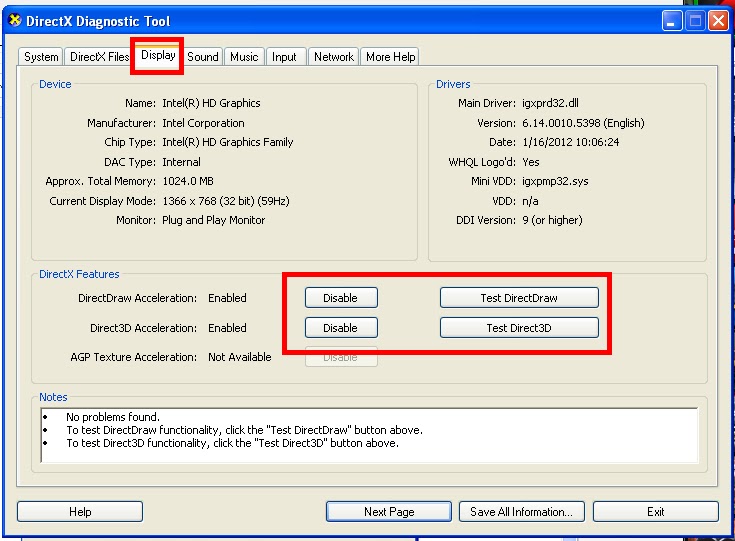
3) this step is for manual import driver, every technician knows this..sadly you need to enable you graphic acceleration at dxdiag window pane..

below are the tutorial:


click start and then select run.


type in "dxdiag" without quote and then press enter.


select display tab and enable directdraw acceleration. for each enable u must test first. the test button are beside the enable/disable button. remember, this 2 need to be enable in order for the fatal error don't appear in the game!

that's all for now...