Showing posts with label Hidden Folder. Show all posts

Saturday, 18 August 2012

Fix icon on Windows 7

Having hard time when your icon behave weirdly, or dispaly incorrect software icon? then you have stumble across crashed windows icon cache.

example:


The icon cache is located at the hidden system folder location below:

C:\Users\User-Name\AppData\Local\IconCache.db


Automatic Solution 

1. Download the .bat file that i have ready for you. [>Download Here <]
2. Save on anywhere in your computer. and right click > run as administrator.
3. Follow the instructions in the command prompt to rebuild the Icon Cache.
4. If the icon still not displaying correctly. you need to do Restore Default File Type Associations.


Tuesday, 13 December 2011

RRT - Remove Restrictions Tool

This software brought to you by Sergiwa company to remove any restriction/tempered rule inside your computer by virus or you accidentally change the rule. The software are fairly easy to use. like always, i am teaching the non-IT people on how to use it. so, those who are expert in computer thingy, please poke around this software.


1. Download The Software

Just download the software at their homesite. 


2. Install The Application

Just Click cancel button and it will pop up new windows.

for me, i just click cancel. the software will tell me i need an administrator right to make changes. then click ok.

3. There ARE DISPLAY!

here list of rule that have been change. the change rule will be highlighted in red. just tick whatever you want and remove.

Now you have the power in your hands to manage your own pc. Please don't charge people who want to use this software by any mean distribution from people to people, or burning in cd or whatever you think it will be benefit of trading.


Saturday, 10 December 2011

Display Hidden File

how to display hidden file? its fairly easy on IT literate people but what non - IT people do? send their computer to service center. thats expected. so here im gonna teach non - IT people how to show hidden file in their computer before or after their computer being screwed up by virus.

1. Determine where u put ur file 
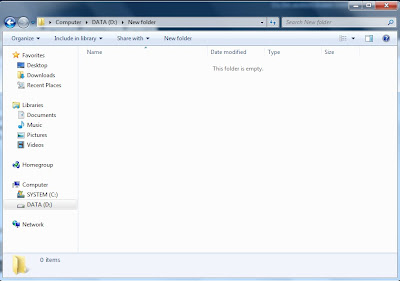
here is the hidden file i put. i remeber i put it here.

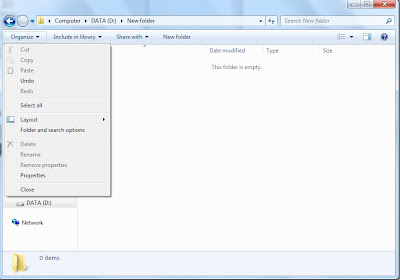
2. Click Folder and Search Option

the option will be at organise tab. if U click the tab you will see drop down menu like this.

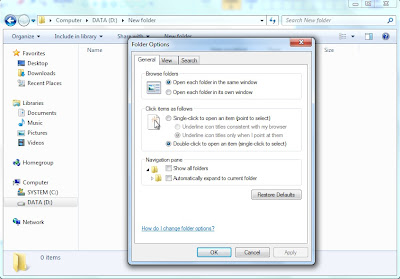
this window will popup after you click the option.


3. Unhide the Folder! Now!

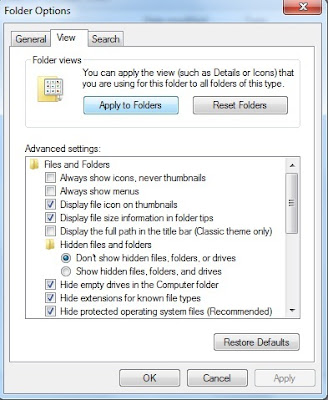
click view tab and it will display the several option regarding folder management.

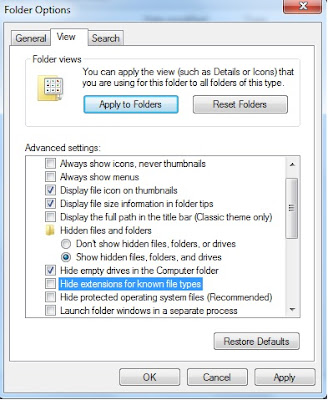
select show hidden file, untick hide extension, untick hide protected operating system. then click ok.

4. Here Is IT!!!!


here are you file. enjoy while it last.


you can navigate all your file inside the folder but you cannot change the attribute because it requires software and skill to eliminate the virus trace. namely flashy.exe. so what you have to do is scan your drive first with antivirus, then remove the virus. all virus that hidden file are not able to be repaired. they once deleted if found.